# External API Authentication

Use this document when Nected calls a **secured external API** through integrations (for example, REST API integrations used in Rules or Workflows).

This guide is specifically for authenticating outbound calls **from Nected to third-party APIs**.\
If you are securing calls to Nected APIs, use [Nected API Key](/nected-docs/security/nected-api-key.md).

### When to use this doc

Use external API authentication when:

* A third-party REST API requires auth (token, key, username/password, or OAuth).
* You want Nected to manage authentication details for integration calls.
* Your Rule/Workflow/API step must invoke protected vendor/internal endpoints.

### Authentication lifecycle in Nected

Nected authentication configurations are created in **Security > Authorization** and then attached to your external API calls.

Operational behavior:

* Nected checks for valid credentials/tokens before API execution.
* For token-based flows, Nected can fetch and reuse tokens according to configuration.
* For expiring tokens, Nected refreshes/re-fetches when required.

<figure><img src="/files/T9zq1VDv9aF0O2xJ9LEd" alt=""><figcaption></figcaption></figure>

### Supported authentication methods

Nected supports:

1. Bearer Token
2. API Key
3. Basic Auth
4. OAuth 2.0

### 1. Bearer Token

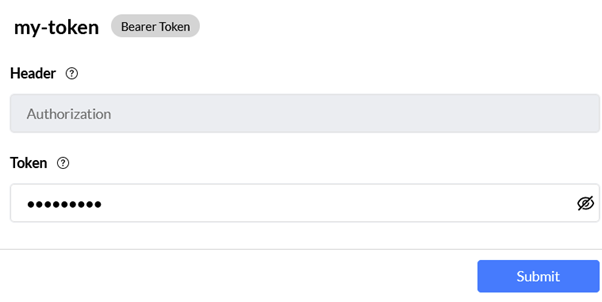
A token-based mechanism where the API expects a bearer token in the authorization header.

<figure><img src="https://lh4.googleusercontent.com/iqC0Z76jZ1GKESgKrFk5xwePkAIViaRhoT46c7hqMtKuPD61M8jqS-2-nMKD6-VwPE7apgLAlxjEyGfMJKMw4HLk5qsl30a3ArfYOw20CtR90TKI3eCP16pyIDUa74-montwGX52NkP5" alt="Bearer Token configuration modal"><figcaption><p>Bearer Token configuration form</p></figcaption></figure>

#### Bearer Token: Header format

```http
Authorization: Bearer <token>
```

#### Bearer Token: Required fields

* Header (default `Authorization`)
* Token value

#### Bearer Token: Best for

* APIs that already issue static/semi-static bearer tokens
* Standard REST APIs expecting `Authorization: Bearer ...`

#### Bearer Token: Security notes

* Treat bearer tokens as secrets.
* Prefer short-lived tokens where supported by the provider.
* Always use HTTPS.

***

### 2) API Key

#### API Key: What it is

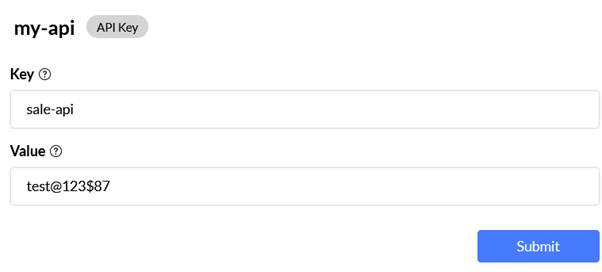
A key-value credential provided by the API owner, passed either in request headers or query parameters.

<figure><img src="https://lh5.googleusercontent.com/SeCmpnm_kVgy_2bUqLUpWv_RZ15p0ONm7IuBC5dqSP0DMBkuRO_3pelERGA1mgVXmpNVRk-__30NXPq9OiCHPwqIIuXuSpbtzZIArz2EJ9sjm-_L5Rtm6DtACgJ4v44UhtFPSGHSiWBO" alt="API Key configuration modal"><figcaption><p>API Key configuration form</p></figcaption></figure>

#### API Key: Format options

Header example:

```http
X-API-Key: <api_key_value>
```

Query example:

```http
GET /resource?api_key=<api_key_value>
```

#### API Key: Required fields

* Key (parameter/header name, for example `X-API-Key` or `api_key`)
* Value (actual secret key)

#### API Key: Best for

* Vendor APIs with key-based authentication
* Internal service APIs that rely on simple machine credentials

#### API Key: Security notes

* Prefer header placement over query params when possible.
* Avoid query-string keys in logs or analytics tools.
* Rotate keys and revoke unused keys regularly.

***

### 3) Basic Auth

#### Basic Auth: What it is

HTTP authentication using username and password encoded into the `Authorization` header.

<figure><img src="/files/8jBfNpVwyHVZvslnw97a" alt=""><figcaption></figcaption></figure>

#### Basic Auth: Header format

```http
Authorization: Basic <base64(username:password)>
```

#### Basic Auth: Required fields

* Username
* Password

#### Basic Auth: Best for

* Legacy APIs that only support username/password auth
* Controlled internal environments where migration is pending

#### Basic Auth: Security notes

* Use only over HTTPS.
* Move to stronger methods (OAuth/API key with rotation) when possible.
* Scope credentials to least privilege.

***

### 4) OAuth 2.0

#### OAuth 2.0: What it is

A standard delegated authorization framework where Nected obtains access tokens from the provider and uses them for API requests.

<figure><img src="/files/rIytkiz4qxCEuNQgLwdl" alt=""><figcaption></figcaption></figure>

#### OAuth 2.0: Supported grant types

* Client Credentials
* Password Grant
* Authorization Code

#### OAuth 2.0: Common configuration fields

* Grant Type
* Token URL
* Authorization URL (Authorization Code grant)
* Client ID
* Client Secret
* Scope (optional)
* Audience (optional)
* Header Prefix (optional, usually `Bearer`)

#### OAuth 2.0: Best for

* Enterprise and SaaS APIs requiring modern, policy-driven access control
* Integrations where token expiry/refresh handling is needed

#### OAuth 2.0: Security notes

* Prefer Authorization Code or Client Credentials based on provider flow.
* Protect client secrets in a secure secret store.
* Review granted scopes regularly and keep them minimal.

### Choosing the right method

| Method       | Best fit                                   | Security level | Complexity  |
| ------------ | ------------------------------------------ | -------------- | ----------- |
| Bearer Token | Token-auth REST APIs                       | Medium         | Low         |
| API Key      | Vendor/internal key-auth APIs              | Medium         | Low         |
| Basic Auth   | Legacy username/password APIs              | Low-Medium     | Low         |
| OAuth 2.0    | Modern third-party enterprise integrations | High           | Medium-High |

### Setup flow (external API integration)

1. Identify the provider’s required auth method.
2. Create an auth config in **Security > Authorization**.
3. Enter required credentials/endpoints.
4. Attach/select this auth config in the integration/API request step.
5. Test success and failure behavior (invalid credential case).
6. Publish with secrets managed by environment.

### Troubleshooting matrix

| Symptom                           | Likely cause                               | What to check                                                  |
| --------------------------------- | ------------------------------------------ | -------------------------------------------------------------- |
| 401 Unauthorized                  | Wrong/missing credential                   | Header/query placement, key/token value, auth type selection   |
| 403 Forbidden                     | Auth accepted but insufficient permission  | Provider scopes, role policy, endpoint access rights           |
| Works in Postman, fails in Nected | Different auth placement or payload format | Header name, query param key, token prefix, content type       |
| OAuth token errors                | Token URL/client config mismatch           | Grant type, client ID/secret, scope, audience                  |
| Intermittent auth failure         | Token expiry or rotated key                | Refresh behavior, key rotation rollout, cached old credentials |

### Best practices

* Keep separate auth configs per environment (staging vs production) when credentials differ.
* Use descriptive names for auth configs so mapping stays clear in Rules/Workflows.
* Rotate keys/secrets on schedule and after incidents.
* Audit and delete unused authentication configurations.

### Related documentation

<table data-view="cards"><thead><tr><th></th><th></th><th data-hidden data-card-cover data-type="image">Cover image</th><th data-hidden data-card-target data-type="content-ref"></th></tr></thead><tbody><tr><td><strong>Connect REST API to Nected</strong></td><td>Learn how to connect a REST API to Nected and use it to trigger Rules and Workflows</td><td><a href="/files/E7Le4pvkcRgJ8dtrULaq">/files/E7Le4pvkcRgJ8dtrULaq</a></td><td><a href="/pages/XNTuWs0PYrWHC7O0oIab">/pages/XNTuWs0PYrWHC7O0oIab</a></td></tr><tr><td><strong>Triggering Rules via API</strong></td><td>Learn how to configure and secure Rule APIs for external triggering</td><td><a href="/files/LsGGWoXhFmbZOHlBhyE1">/files/LsGGWoXhFmbZOHlBhyE1</a></td><td><a href="/pages/RmVsCRpL9BVLStXl4Bhs">/pages/RmVsCRpL9BVLStXl4Bhs</a></td></tr><tr><td><strong>Triggering Workflows via API</strong></td><td>Learn how to configure and secure Workflow APIs for external triggering</td><td><a href="/files/TLd2kDG0gVGRqz8jFIHH">/files/TLd2kDG0gVGRqz8jFIHH</a></td><td><a href="/pages/M8Zpbv6n8P7ZirBRdXZe">/pages/M8Zpbv6n8P7ZirBRdXZe</a></td></tr></tbody></table>


---

# Agent Instructions: Querying This Documentation

If you need additional information that is not directly available in this page, you can query the documentation dynamically by asking a question.

Perform an HTTP GET request on the current page URL with the `ask` query parameter:

```
GET https://docs.nected.ai/nected-docs/security/external-api-authentication.md?ask=<question>
```

The question should be specific, self-contained, and written in natural language.
The response will contain a direct answer to the question and relevant excerpts and sources from the documentation.

Use this mechanism when the answer is not explicitly present in the current page, you need clarification or additional context, or you want to retrieve related documentation sections.